Artwork Guidelines
Before preparing and submitting your files, please follow our handy artwork guide to prevent any delays with your order.
Print-ready Artwork Checklist
File Format
Please supply high resolution PDFs created from Adobe Illustrator or InDesign. We cannot work with artwork files from Microsoft Word, PowerPoint, Excel, and Publisher as these are not designed for commercial printing.

Size
Setup your artwork files to the exact size that you wish your job to print (the finished trim size). For example, if you require your artwork to be printed at 300x400mm, please setup your artwork at 300x400mm not A3 (297x420mm) as this will not proportionally scale.

Colour
Please use CMYK colour mode, not RGB. If colour matching is required, please provide a Pantone Coated® (PMS) reference or send us a printed sample. Bear in mind that monitors and desktop printers do not produce accurate representations of the printed colour.

Images
All images in your artwork file should be supplied at 300dpi in the correct colour mode at 100% of the final image size. Images and logos downloaded from the internet are usually between 72-96pdi and once upscaled result in a blurry or pixelated image, therefore unsuitable for printing.
Bleed & Crop Marks
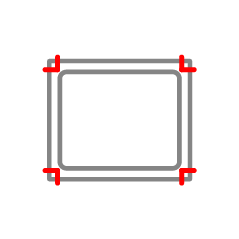
Generally we do not require bleed or crop marks, however for stickers and banners with colour or images to the edge of the artwork we will require 5mm bleed to all sides and crop marks to show us the edge.

Fonts
All fonts should either be embedded or converted to paths. Please use fonts that do not have any license restrictions.

Proofread
Please check your artwork to find and correct any mistakes.

Sending your files
Once you are happy you have followed the above guidelines, please send your artwork to [email protected] . If your files are larger than 15mb, we recommend using a free-to-use file sharing website such as WeTransfer.
Logos
Please supply vector logo files created from Adobe Illustrator as either PDF, AI, or EPS. We do not accept non-Adobe based files such as Microsoft Word, PowerPoint, or Publisher. Logos downloaded from the internet or copied from email signatures may look great on screen, but once upscaled they result in a blurry or pixelated image and therefore unsuitable for printing. Send your logo files to [email protected].
Please also supply your brand guidelines so we can ensure logos are printed with the correct colours and adhere to any exclusion zones.

Site Plans
Please supply vector artwork as high-resolution PDFs. Screenshots of maps on the internet may look ok on screen, but once upscaled they result in a blurry or pixelated image and therefore unsuitable for printing. Generally, site plan files can be emailed to us but for larger files over 15mb, we recommend using a free-to-use file sharing website such as WeTransfer.